Infinite White Background – How To

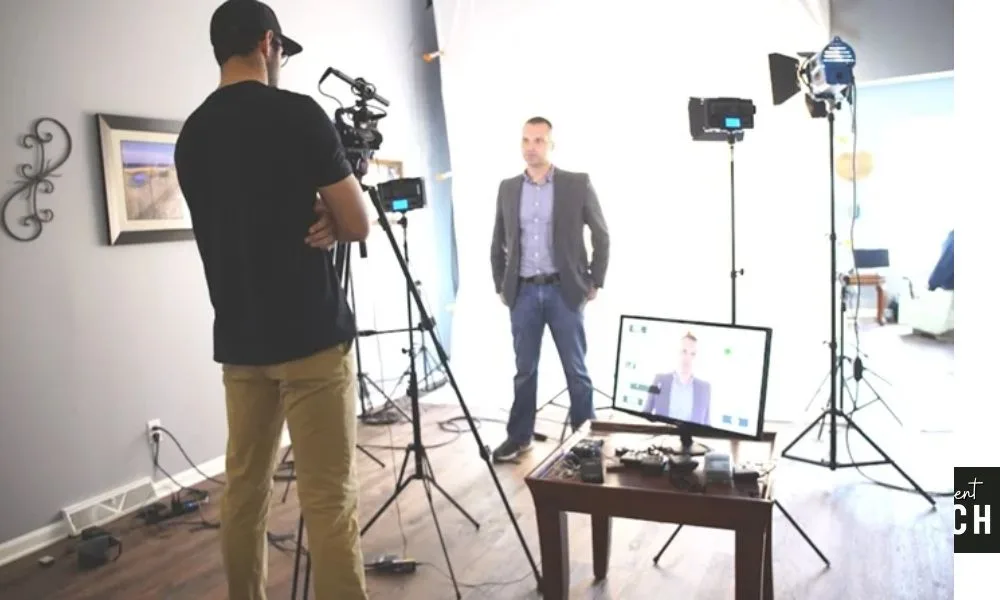
In three very simple steps, this is our simple guide to creating an effective infinite white background.

3 Key Points to Remember for infinite white:
1) Light and Over Expose the background – light light light!
2) Pull your subject away from the background
3) Light your subject separately and adjust as needed.

We start with a white seamless paper backdrop on a backdrop stand. Using paper instead of cloth leaves no wrinkles for shadows to appear. These tips will also help you put together a better Green Screen for keying out subjects.

For lighting we’re using 6 fairly inexpensive CFL (compact fluorescent) lights. Each CFL Light has 5 bulbs and light output can be adjusted by turning off the individual bulbs within. Each head has a dedicated softbox and two layers of diffusion for flat even lighting. The lighting kit also comes with all the bulbs needed. These were from Amazon, but they can also be found via ebay here: CFL Lighting Kits + Softbox for Video Lighting

It’s possible to build this entire setup with white fabric, and cheap halogen shop lights or household tungsten bulbs, but after you add everything together, these CFL’s don’t seem like such a bad deal. Especially since they won’t generate as much heat or draw excessive power that can blow out household fuses. Below are some helpful links to the products used.

In the video above I go over how to crop the lights out in post.


2000 WATT Digital Photography Lighting Studio


Photography Studio Background Stand with Crossbars + Case


Seamless Paper Backgrounds

127 Comments

  • Dave Dugdale says:

    Nice job Oliva, what camera did you use to film this, the Canon 7D?

  • I’m looking for lights like these available in Europe (the Netherlands).
    Anybody knows where I can find that?

  • William says:

    What mic are you using?

    Looks like a Rode Video Mic… Is that right?

  • alessio says:

    sorry…. but… but… i’m falling in love…

    • Anthony says:

      Ok, you’re probably the 23rd person in the past day that i’ve seen commenting on how hot you are for Olivia. If you notice, she pays no attention to the comments and you just sound like another horny dude.

      If you cant handle a hot girl on your screen and have nothing useful to comment about the content then go subscribe to some porn website.

  • [...] our infinite white video, we demonstrated how to create an all white backdrop. In this latest installment of our tutorial [...]

  • Youn says:

    So, how many actual wattage is each of these bulbs? Is running 6 of these lights safe on a 20 amp typical household circuit breaker?

  • Moe says:

    Olivia,

    Ya, I too am wondering what studio lighting kit did you guys use for this video? Where can I em’ too?

    Thanks for everything you’re doing Olivia!

  • Brendan says:

    So you mention a program in this video where I could create the effect and it sounds like you said it was called “post” but i’m not sure.

    • Olivia says:

      Brendan, “post” is just a term in reference to post production. You can use a number of programs to key out the lights on either side of your subject. The editor who edits the OTech videos uses Final Cut Pro. =)

  • Barrett says:

    Hey Olivia,

    I noticed in your video you guys only did bust shots. What if you wanted full length shots? Would you need to light differently?

    Also, how wide is your paper, how high is it, and how far does it extend out?

    Thanks! Your video has been really helpful!

    • Barrett says:

      And does a white muslin backdrop work as well as paper?

    • Olivia says:

      Barrett, you don’t need to light differently for full length shots. The dimensions of the paper don’t really matter as long as the subject and the white directly behind the subject are properly lit. We fix the outer edges in post. In our experience, muslin doesn’t work as well because it casts more shadows.

  • Terry says:

    Olivia, I’ve enjoyed your video blog. I’m a realtor and just finished my first white background video found here http://www.youtube.com/watch?v=YfmQzHB-q2Y. I seem to get what looks like a white haze on myself. Any thoughts? Can you share what settings you’re using on your camera? I have the same ephoto kit. The two fill lights on you…how many of the 5 lamps are turned on for each side?

  • movieman says:

    Hi Olivia,

    Thanks for this video I nearly went to buy very expensive light but thanks to your advice I didn’t :) My question is as I have found similar lights to buy in UK, should I go with 4200WATTS which is 3x1400W lamps (7 bulbs in each) or should I be fine with 2250W which is 3×750 lamps (5 bulbs in each). I am considering getting 2 of those so I get 6 lamps in total. With the 4200 watts set I get a boomstand which allows me to hang the light over the object. In my videos I will present myself and my bike (sometimes a table) so I need really nice white background and also well lit subject (either me or the object I am showing). Will I be able to achieve that with any of the sets mentioned above ?

    Many thanks

    • shoot_this says:

      Hey Movieman – also in the UK, there are a few different ones on the market; eBay etc – where did you get yours from?

      Cheers, and Olivia I am loving your blogs and vids, so helpfull!

      Beef

  • Pretty component to content. I just stumbled upon your website and in accession capital to say that I get actually enjoyed account your weblog posts. Any way I will be subscribing on your augment or even I success you get admission to constantly rapidly.

  • Tony says:

    Thanks for this video Olivia. What editing software are you using and did you “mask” to remove the lights and your position in post?

    Thanks.

  • Tony says:

    Thanks Olivia

  • J says:

    How do you remove the lights in post.

    I cropped out the lights.

    I placed a white background in post. (Have used eyedropper, 235, 255 white to match my background)

    The missing crop area fill looks good on the computer but the missing cropped area fill displays as grey on the iphone and ipad.

    I really need to fix this. I have several videos I need to film asap.

    Been asking for help everywhere. Any advice.

    View on your iphone HERE

    • Olivia says:

      Increase the highlights in your video so that the background is blown out to totally white. Since she isn’t moving much you can mask the subject out to match the whites. Also you can try bringing up just your whites. Help? =D

  • J says:

    Thank you soo much Olivia.

    I’ve been begging people around the web for the answer. I think that did it.

    Thanks a million.

    here

  • movieman says:

    So any tips for my question:

    I have found similar lights to buy in UK, should I go with 4200WATTS which is 3x1400W lamps (7 bulbs in each) or should I be fine with 2250W which is 3×750 lamps (5 bulbs in each). I am considering getting 2 of those so I get 6 lamps in total. With the 4200 watts set I get a boomstand which allows me to hang the light over the object. In my videos I will present myself and my bike (sometimes a table) so I need really nice white background and also well lit subject (either me or the object I am showing). Will I be able to achieve that with any of the sets mentioned above ?

    • Olivia says:

      Hello, how large of an area are you planning to light up? 6 of the 5 bulb 2250W lamps for the setup you’re explaining should be just fine. We use six 5 bulb lamps at 2000W each and this provides us with a sufficient amount of light for the OliviaTech videos on my blog. Keep me posted on your videos! I’d love to see the results.

      • movieman says:

        well size will be up to lets say a dinner table for 6 people so (2 on the longer sides and one on each top) so the plan might be around 2.5 – 3 meters wide. Difference in price is nearly 50% between the sets I am looking at but they have the boomsticks which would allow me to have light from the top too, so maybe it’s worth investing bit more to gain bigger flexibility…

        • Olivia says:

          You should be able to purchase a boom pole for cheaper on its own though, no? You have room to expand with the more expensive setup. It boils down to what you think we really may need and your budget. But for that setup, the 5 bulb lights are sufficient.

  • Grace says:

    Hi Olivia,
    Do these lights come in a set of 6?

  • Brja says:

    Hi Olivia,

    I loved this video and was wondering if you could tell me what video camera is recommended to achieve this effect?

    I noticed that you mentioned using a Canon 5D, however isn’t that for stills? Would it be better to purchase an HD video camera instead?

    Any advice you have would be greatly appreciated!

    Thanks,

    Brian

    • Olivia says:

      Hi Brian, the 5DmkII is a great camera for both photo and video. Any video camera will work with the infinite white setup. It’s not about the camera so much as it’s about the lighting and post work flow. =)

  • Brian says:

    Hi Olivia,

    I really liked your video and was wondering if you could recommend a reasonably priced video camera to achieve the infinite white background effect (preferably in the $500 – $1,000 range)?

    Does the camera need any specific features to be suitable for this, or will any decent HD camcorder be enough?

    Any advice would be greatly appreciated!

    Thanks and best regards,

    Brian

  • John says:

    Hello Olivia,

    I saw that you mentioned shooting this video with a Canon MKII. Is there a reason you prefered using that camera instead of an HD camcorder? Wouldn’t it be easier to achieve these results using a camera that has an autofocus feature in video mode?

    I’d appreciate your advice.

    Thanks,

    John

    • Olivia says:

      Hi John, at the studio we only shoot with DSLRs. When shooting video with a DSLR, you generally don’t want to use the autofocus. You have more control in manual and you don’t pick up all of the noise from the autofocusing.

  • Kit says:

    Hey Olivia,
    Found your site through Myxtv. Awesome stuff! (both Oliviatech and Myx) Quick question though, I mostly do still imaging with the 5D mkII but lately been playin with the video portion to grow my abilities in the field. Since autofocus isn’t used, is there a smoother or more fluid way to focus manually? (video focusing looks choppy on playback)
    Thanks a bunch!

  • Shantle says:

    Hello Olivia,
    I was wondering if 3 SOFTBOX LIGHTS PHOTOGRAPHY VIDEO STUDIO PORTRAIT SOFTBOX 2400 WAT LIGHTING KIT will work 2 sets of them of course as opposed to the 2000 WATT Digital Photography Lighting Studio 3 sets. I will be using to photograph clothing on a mannequin. Would this work well?

    Thank you in advance
    Shantle

    PS
    Any other suggestions would be greatly appreciated.

  • Sky says:

    Beginner on a Budget

    Hi Olivia,

    1st Wondering if you could give me some helpful advice. I’m a beginner photographer. Is my Canon EOS Rebel xti, a good quality camera to shoot nice clear images with little to no noise?

    2nd I’m having the hardest time figuring out proper lighting equipment to get. This tutorial is a great option, but can you use it on location? I’m also wondering about off camera flashes vs flash heads… which one is better to use?? and can flash head be used on location?

    Any advice or recommendations would be greatly appreciated!

    Thank you for your time!

    • Olivia says:

      Sky, hello! Okay, a few things before we start here. First off, you’re camera is a lovely one. Yes, it is an entry level DSLR but you’re beginning and learning the basics on the Rebel XTI is totally doable. You’ll most certainly be able to capture beautiful and quality shots with it, you’ll just need to know how. Keep in mind that the noise or grain introduced in photos typically comes from having the ISO set too high. Play around with the manual and auto focus. Since your camera doesn’t have the spot metering, only the center weighted metering, be sure to remain aware of your exposure when in AF.

      As for the lighting, what type of shooting are you doing? This softbox setup isn’t very good for outdoor photography, but it will certainly work in a more controlled setting like a studio. For a beginner kit I’d look into getting a speedlite with a diffuser, a reflector kit and if you’re looking to invest, perhaps some strobes.
      A flash head is anything that flashes. You can use a speedlite on your camera or off camera or even put it in a softbox or pair it with a reflector. It all depends on what look you are trying to achieve. A simple light stand is good to mount these, also Nasty Clamps work wonderfully for flashes.

      Nasty Clamps Video

      • Sky says:

        Thank you for replying and advice,

        So glad I have a good beginner camera. I’m looking to open a portrait/ fashion photography studio in a couple months, will this still be an appropriate camera or should I look into upgrading? If so what would you suggest?

        Though I’m opening a studio, I still would like to shoot outdoors, on location, so I’m looking for lighting that would also be portable. Are speedlites and strobes portable? Do strobes flash? Do you have any suggestions for good but not super expensive portable lighting equipment?

        I don’t have tons of money to spend on equipment but I still want to try to get good quality equipment.

        Thank you for your help!

  • Sky says:

    I’m sorry I having such a hard time understanding what lighting equipment to get, I’m being pulled in a million different directions.

    One more questions:

    I thought flashes, speedlites and strobes were all different names for the same thing?

    • Olivia says:

      Sky, for indoor photography, your camera is perfectly fine. If you’re planning on shooting professional photos both in and outdoors, I’d look into upgrading. Your camera is great but the processor is older and if you’re investing in opening up a professional studio, I’d upgrade. A Canon 60D or even a Rebel T3i would be sufficient and get you the newer and improved image processor and features.

      Nowadays, flash and strobe really mean the same thing. Both provide a flash. There are different types of flashes our there, but yes, you can mention either term and both apply to “flash.” Speedlite is actually specific to Canon but used in reference to a flash just the same. Think, Kleenex or Xerox.

      Flashes are very portable. The softbox lights on the other hand, not very portable at all. If you’re going to be shooting on location, I’d look into learning how to setup and use your flash(s). Understanding them is your best bet on optimizing your gear.

      As far as an inexpensive portable setup for photography, here are some suggestions for basics:
      HERE

      Also, get a reflector kit. This will help you out a ton:
      http://oliviatech.com/tips-on-using-a-reflector

  • Shantle says:

    Olivia I wont be using strobes at all. overexpose the background? If I have the set up just like you have in the video that should work perfect right? Im using a nikon d90, could you suggest a setting in which I should have it? With this set by purchasing two of them I def will save money as opposed to the 3 two piece sets. No fancy stuff with equipment except my camera and the lights. Im going for a look like this HERE.
    Will I be able to create this look with the kit I mentioned? lol Im just triple checking. I just want to be sure before I purchase the sets I mentioned. Im terriable Im sorta a perfectionist and if I need to buy the one you mentioned for the crisp white background I would do that as well. What would the strobes do if I were to get them or do you think I dont need them? Sorry Im all over the place I just get a little confused when it comes to some lighting. Thank you again for your response.

    • Olivia says:

      Shantle, The lighting you are looking to get will be sufficient to achieve your look. See how we positioned the lights? Be sure to overexpose your backdrop to get the clean even white. No need for the strobes, get the kit and go from there. Remember, you can do some editing in post as well to help you get to your desired look.

  • Josue Fame says:

    Hello Olivia, my name is Josue Fame, I am an art student. My actual major is painting. However, I will like to pick up Photography as an hobby. I am very visual. I need tips like, books ( for a beginner), supplies( I like the list of supplies you put on your page, but more information wont hurt), information about indoor and outdoor shooting( mainly portrait).
    Thanks

    • Olivia says:

      Josue, what type of camera will you be using? Let’s start there. Pls email me from the “Contact” section of the blog for this =) Thank you! We’l get you some answers.

  • Lee says:

    Hi Olivia,
    It’s Lee here from Ireland.

    I would really appreciate your expert advise if you have the time.

    Olivia, I want to invest in proper lighting to record footage infinite white background and chroma key, (the same style as in hour example video) I know you recommended where to buy the lighting in the US but can you recommend anywhere in Europe?

    Finally, I’m interested in buying the JVC GY-150E video camera – is it a good camera to go for?

    Olivia, I hope you can help, any advise is greatly appreciated!

    All the best from Ireland.

    Lee:)

    • Olivia says:

      Lee,

      Are you talking about the JVC GY-HM150 ProHD Camcorder? I couldn’t find the exact model you mentioned.
      As far as lighting goes, I am not familiar with sellers or companies based in Europe. Have you checked out Amazon for Europe?

      • Lee Gooch says:

        Hi Olivia,

        First of all big thanks for helping me out it’s much appreciated. Great to get your expert advice!

        It is the JVC GY-HM150E Professional Standard & High Definition Camera that I am looking to buy. Is it a good enough camera?

        Regarding the lighting I found someone in the UK who sells them.

        Below is the spec of the lights:

        2000w Lighting kit Softbox Set Video Photo 5500k Lights
        2 x 50cm x 70cm Softbox (20” x 28”)
        2 x Light Stands 190cm
        2 x 5 bulb Light Socket
        2 x UK Power Chords
        10 x 45 Watt 5000k Compact Fluorescent Daylight Balanced Photo Bulbs

        Olivia, would the about lights be o.k for Infinite white background and Chroma key, if so i would need 3 sets of the above given me 6 softboxes.

        Thanks again for all your help, advice and time.

        All the best,
        Lee :)
        Ireland

        • Olivia says:

          Lee, first off, as for the lighting, yes, this amount of light is sufficient for both infinite white and chroma key. 4 of these softboxes typically would be fine for infinite white but if you’re doing chroma key, I’d go the 6 light setup route. As for your JVC GY-HM150E, this looks like a great camcorder! The native Final Cut Pro format that allows you to edit without conversion or transcoding is heaven sent! I think you’re going to love it. I’m sure you did all the homework necessary. :)

          • Lee says:

            Thanks Olivia appreciate all the advice and feedback! I can’t wait to give this infinite white background a go, when I get the kit up and running would it be ok to send it to you to get a bit of feedback. It will be sometime in February/early March.

            Thanks Olivia,

            All the best from the hills of Donegal in Ireland.

            Lee :)

          • Olivia says:

            Lee, yes, please keep me posted!

  • Robert says:

    Hey Olivia I definitely appreciate the work of your crew for it has given me a lot of insight to the behind the scenes things it takes to get nice shots and video. Right now i’m shooting with a 7d and have only a 24-70mm f2.8L lens. I’m looking at doing some portraits in a large space that I have at the home. I know from the video to use 4 of the lights to blow out the background for the infinite white. My question to you is when shooting portraits (all kinds full body, half, and headshots) Will my 580ex ii be sufficient enough to get professional quality shots with this background set up. I’m wondering if that will give me enough flash to properly light my subject in the front or will i need 2 580ex ii? I want the front space to be open so I can maneuver better and get different angles for my shots without worrying about the light’s in the front being in the way. Thank you!

    • Olivia says:

      Robert, the setup we show will be sufficient light for your job. Do some test runs with a subject and your setup. You’ll get a feel for the lights, your 580ex ii and then the post process. In post you can really touch up the backdrop if needed to make an exaggerated white. Have you tried your setup out?

  • Robert says:

    I haven’t set it up yet…But I will soon…i have to order the items first…just wanted i guess the reassurance that the setup would work fine! Thank you! I will post results when I have it set up! :-)

  • Travis says:

    Hey Olivia,

    We were looking for a good white background tutorial for our new setup and yours stood out as the best! Due to limited budget I had to create mine with only 4 of these lights for the entire scene.

    My setup is as follows:
    2 CFL Lights (10 CFL bulbs) on the background. 2 more halogen work lights for fill
    2 CFL Lights (10 CFL bulbs) on the subject.
    10′ separation of background and subject

    I am having a bit of trouble, I cannot get the subject to be properly exposed. I am using a t2i with MagicLantern and have white balanced for the background (about 4400k is what I believe is correct), set my shutter at 1/60, and adjusted my aperture until the zebras appear uniform to indicate a blown out background. Also ISO 100

    However, my subject just looks very pale and a little bright, any input you can give a novice? I noticed that the mix of halogen and CFL could be throwing off the whitebalance, My thought is that maybe I should WB for the CFLs as these are what is lighting my subject then fill the background with halogen?

    Thanks again!

    Thanks!

    • Olivia says:

      It seems that your running into trouble due to the mix of halogen and CFL. Halogen is blue and CFL is yellow so you can’t properly white balance for both. Use all CFLs or correct the halogens with gels. This should fix the problems you’re experiencing, Travis!

  • kevin says:

    Is there a specific gel that will properly match a halogen to a CFL light?

  • Arthur says:

    Hi Olivia,

    Great Video. Was wondering if you had any tips or a small studio kit suggestion for small items for a infinite white background. Looking to take pictures of small items from wallets to phone cases to sell on eBay and want a really nice display.

  • tania says:

    Hey what are you using as the background?
    Muslin? Savage paper? Or… ?

  • Jesse says:

    We have a web business for our boutique. I have been using PSCS5 to white out the background from the model. I am looking for a way to skip the long process of whitening the background from all the shots and it seems that we need purchase the lights you suggest and a white background, as we are using grey currently.

    One issue is that we do not have enough room for five lights, what would you recommend for a small scale room?

    What happens to pieces that are all white?

    • Olivia says:

      Hi Jesse, you can achieve the infinite white look with only 4 of the lights. What you want to do is overexpose for the white first. Make sure the light is very bright against the seamless paper. Next, pull the model away from the back and then expose for the properly lit subject. Because the exposures will be different, the white clothing will not blend in. What are you currently using for your lighting?

      • Jesse says:

        Thanks for the help. We are currently using four 55W 5000k bulbs in small round shields. We obviously need to upgrade to make this easier.

        • Jesse says:

          Wondering if there is a plastic white flooring out there to put down instead of the paper. I am shooting from the feet up and the paper gets pretty dirty half way the shoot. It would be nice to have something that can be wiped off.

  • Rich Brennan says:

    Olivia,

    I love your videos. Thank you. I’ve got a question regarding editing. In your video about the white endless background, you can easily move cameras and unwanted objects out of the picture and cover them with white. You can also move the subject around the picture and input text or pictures. You do this during the post editing process.

    I don’t know how to do this. Can you point me in the right direction of what software I need to get in order to edit correctly?

  • Mike says:

    Hey Olivia. What if you wanted to show detail/color of a particular seamless background instead of an all white? I would guess just don’t overexpose the background? How would you light the background though to show detail/color? Thanks in advance!!

  • Mike says:

    Hey Olivia, Sorry, another question. What equipment should we use to hold up the seamless paper on the background stands? Please insert a link to the item we should get. Thank you again!!

    • Olivia says:

      Hi Mike, you always want to light separately for the backdrop. Expose for the back first then light your subject and expose separately. If you want to show detail in the backdrop, close down your aperture so your depth of focus is greater. Here is a link for the backdrop stands: CLICK HERE

  • Mike says:

    Thanks Olivia!!! Thank you so much! I see the backdrop stands link. It’s the same one you have above. My question was, what should we use to hold up the seamless paper on that Background stand. Clamps like these maybe? HERE

    Thanks again!!!

  • Paul says:

    Olivia,

    Could you share your typical exposure and ISO settings for you infinite white set?

    I’m attempting to replicate it (thank you very much) with 4 Westcott Spider Light 6 fixtures to light be background, two ePhoto CN-1200H’s (Key and Rim) and one more Spider Light for a fill. I’m shooting a with 5D2. While I am starting to get some results, I’m unsettled by the low light meter readings I’m getting.

    I come from the still studio strobe world and am accustomed to shooting at ISO 200 and choosing my apertures from between f1.2 and f/11 as needed. With my new video lights I’m not getting anything close to that. I sure would like to know how much light you are getting out of your lighting setup.

    Thanks again for all of your great work!
    - Paul

    • Olivia says:

      Paul, what is your shutter speed? You want to fix your shutter speed a 1/50. Expose for the background first, then expose for your subject. If you’re shooting high key images, don’t be afraid to push the ISO. Sometimes we have to shoot at 1600. We don’t really have “typical” exposure settings. If you have enough light, you always want to get the ISO down, yes.. but again, don’t be afraid to booth the ISO if you need to!

  • Paul says:

    Is my post still awaiting moderation?

  • Tom says:

    Hi Olivia,

    I was wondering if you use the shadowbox “cover” for the lights that light up the background? I have similar softboxes, but only 2, with 5x60w each. I was wondering if this could be sufficient, especially if I don’t use that “cover” (white transclucent material in front of bulbs), to increase light output. Of course, another question is whether this would make the lights uneven or too narrow. For the front, I will be trying with a simple black umbrella single 85w cfl, and for a second front, possibly my recently purchased 320LED panel. I also have an overhead softbox w/single 60w cfl. PS: I don’t have the background setup yet, so I can’t test it out myself. Just wondering if I need to buy another 3 softboxes…. I’d like to do full figure shots but not much more (room is probably approx 15 deep, 12 wide).

    Lastly, I will be buying a DSLR shortly and expect exposure won’t be a problem on that, but for now I have a1080i consumer camcorder. Will it be possible to do infinite white background on that, due to it lacking manual controls?

    Thanks a lot for all of your useful advice on this blog!

    • Olivia says:

      CFL lights emit light from the sides, for this reason, the umbrella will not give you the same effect as the softboxes which throw all of the light from the CFLs around and out onto your subject. I don’t think you’ll have enough light to achieve this look. I’d suggest getting more lights with softboxes.

  • Kastur says:

    Hi Olivia,

    Can you recommend any softboxes that are not based on a 4 rod setup? I purchased three of the softboxes that you have listed and only one maintained its shape. The other two keep having the rods snap at the end and completely unraveled the box. The softboxes never traveled so I know movement was not an issue. Any suggestion would be helpful.

    Thank you.

    • Olivia says:

      You should contact the seller! That should never happen to the product, we have many of the same lights and I’ve never had that issue. Most of those style of lights (at that price) are made the exact same way. Instead of buying again, contact the seller first. Keep me posted, don’t spend more money than you need to!

  • Thanks for this tutorial. It’s really helpful when you are starting out to have these great videos, I’m definitely going to try it out.

  • Jordan says:

    Hi Olivia.

    I was wondering if you can make a tutorial to do this infinite white background but from the feet up, full body shots. I noticed in this how-to, the shots were knee or waist up.

    Or, if you can refer me to someone else’s tutorial, that would be greatly appreciated!

    Lastly, what program would you recommend for filling in the white borders in post and moving the subject around as you did in the end of your how-to?

    Thank you!
    -Jordan

    • Olivia says:

      Hi Jordan, filming from the feet up is the same, you would just frame your shot for a wide rather than a medium. What program are you using to do your post work? In Final Cut Pro, you can crop out the lights very easily.

      • Jordan says:

        Olivia,

        I am not too sure about the feet up part. From what I understand in your tutorial video, you distance the subject from the background, i assuming, 1 to light your subject separately, secondly to avoid heavy light spill onto the subject. Now if the subjects feet are directly on the paper when I go to blow out the lower end of the paper, there will be heavy light spill onto the subject’s lower legs & feet, from the knee down.

        I use Sony Vegas Pro for all post work.

        Thanks!
        -Jordan

        • Olivia says:

          Jordan, I need to perform a test on this. But it seems like there is always going to be a shadow. I understand what you’re saying, I think you’re introducing too much light onto the subjects feet area.

  • nanda says:

    The video is fantastic, thanks olivia. I’ve one question, I want to use the same technique to shoot a video of our entire 3 member band in one frame – singer, drummer, keyboard all in one frame. How many lights will I need to over expose the background? I’m guessing that the center of the frame will not be as bright since the lights will be on extreme sides of the band members & maybe not enuf light will hit the center. The 2 lights would be placed approx 12 feet apart. If there are any specific tips to shoot 2 or 3 people standing together , please let me know !

    • Olivia says:

      @nanda I’m so sorry I’m late to this comment! Did you try shooting the band? How did it go? How many lights will you have for this setup?

  • Will says:

    Great video. I’m ready to buy these lights. Just a quick question, should I buy the 2 set pairs or this set of 3s? I have a white background and also plan to finally make use of my green screen.

    • Olivia says:

      For green screen, I would suggest buying 2 of the 3 light sets. What is the size of the space you are trying to light? Chromakey needs sufficient light, you don’t want to come up short!

      • Will says:

        Thanks for the reply. I was ready to check-out with 3 pairs of the 2 light sets but then saw the 3 light kit for a better price. Just hope the watts and everything are the same or better. I plan to have 6 total either way. I have 20×30 backdrops.

  • Mel says:

    In the last bit of this video, you’re talking to someone in the B&H booth… what slider is that? looks like a roller bearing model… I tried to be a sleuth and look on B&H’s website, but alas, I’m no Sherlock. Please?

  • Hi Olivia,

    I purchased the same white paper background you recommended but it looks like your paper background is MUCH wider.

    - Did you double up the paper to make your background wider?
    - Can you recommend how wide the background should be?
    - Can you tell me approximately how many feet in front of the white background you recommend standing?

    Thanks for any info you can provide.

    ~ julian

  • Dale says:

    Two quick questions. You prefer the Rode mic to a wireless mic in the studio and what picture style do you like to use? Do you like the stock Canon Neutral picture style or do you like more of a flat style with sharpness and contrast turned all the way down and saturation two notches to the left from center or do you like a stock Canon Faithful setting? Thanks for your imput.

    • Olivia says:

      @Dale I’m sorry for the very late response, I’m just seeing this comment now! In the studio, as long as I have a lav, I’m happy. Lav’s bring the signal to noise ratio where it sounds best for me (compared to a shotgun mic boomed, for example). We always shoot in standard mode for the videos we produce for OTech. If I were to shoot something I know I will want to tweak in post, I would shoot as flat as possible. :)

  • Jonathan says:

    Hey Olivia;

    So based on this video, I hit Amazon and purchased 2 of the ePhoto 4500W Digital Photo light kits (6 total lights). Set them up in our makeshift studio tonight with a Ravelli white backdrop and stand. It doesn’t look bright enough (although 1 bulb shipped broken but that shouldn’t be enough to make it look dark…could it)?

    Also, have any tips for lighting / shooting into a Chroma Key Green backdrop?

    Thx!

    • Olivia says:

      @Jonathan How large is the space that you are trying to light? The 6 lights should really be sufficient enough to light the set. Can you list your setup and camera settings? Also, are you blowing ou the backdrop first then exposing for the subject?

  • Justin says:

    Hi Olivia,

    I am an expert and have am used to shooting chroma keys on a custom built green fabric, but I want to do a true white infinite background.

    I LOVE your tutorial, but it did bring up one question. I want to have a grandma with a guitar walk around a bit full length (my portable green screen is up to 12 feet in width). So I have 2 questions:

    1. I could imagine the paper rolls are quite noisy. Are they appropriate for someone walking on and giving a rock kick?
    2. How wide have you seen paper rolls?

    Thanks for any help you can give. Justin.

    • Olivia says:

      @Justin I’m sorry! I’m just seeing this comment now. Did you shoot this video? How did it go. To answer your questions, the paper rolls are not noisy if they’re laid out flat on a flat surface. The rolls come in a wide variety of lengths depending on how small or large your space is. Savage makes some great seamless paper. I’d suggest purchasing it from a dealer near you to avoid paying the shipping fee.

  • Michael says:

    Just curious, do you think you could have gotten the same results when lighting the screen if you had used 2 softboxes at 22 x 24 inch boxes with 5 x 60watt bulbs as oppsed to 4 16 x 24″ boxs with 5 x 45watt bulbs?

    I only ask because I just watched another video where someone did a test on the difference between each size box out there as they lit a wall: HERE

    Thanks!

    • Olivia says:

      @Michael I don’t think so, although I have not run a test to see if this is true or not. I only say I don’t think so because in order to get the infinite while background look, we needed to first over expose and properly light the back drop then light and expose for the subject. only having 2 sets of lights would be insufficient for the lighting technique you need to get proper lighting and exposure.

  • Dean says:

    Any chance you have a quick tutorial of how to mask out the lights in post as you mention?

  • Russell says:

    Hi Olivia,

    Would the F&V ring lights work to light subject and background if I have 3 of them. I have 2 light-boxes now but curious about how many rings I should purchase.

    • Olivia says:

      @Russell Yes, the F&V R-300′s can take the place of the two softbox lights easily. A nice 3 point lighting kit is a great foundation. They are dimmable and you can purchase a milk diffuser if you want to get the light as closely diffused to the look of your softboxes.

  • Tee Flow says:

    at the end of the video how did you fill end the lights on the side with white background? then move it around?

  • Laura says:

    Hi Olivia, which cases would you use an infinite white background versus a green screen over a white background? I’m working on an instructional dance video, so I’m also wondering how sturdy the paper on the floor is. Will it stay put? Thanks so much!

    • Olivia says:

      @Laura I think it all depends on the look you’re going for and your budget. I don’t think the white paper will stand up very well to dancing on for the duration of multiple video shoots. Of course, you can change the paper out, I just don’t think it would hold up to a lot of foot traffic both in its integrity and staying put. A set might be a better option, but again this comes down to budget. You also may run into the same obstacles with a green screen as you would with the white paper. Keying out for this type of video also might give you some trouble. I’d test out your options before committing.

  • Tristan says:

    Hi,
    I am a first time user of Final Cut Pro X, and I’m trying to do what you did in your video, but can’t seem to figure out how to crop out the sides and fill in with white on the sides.
    Can anyone tell me how I might do this?

    Thanks,
    Tristan

  • Tristan says:

    Nevermind, I figured it out.
    THanks!

Leave a Reply

XHTML: You can use these tags: <a href="" title=""> <abbr title=""> <acronym title=""> <b> <blockquote cite=""> <cite> <code> <del datetime=""> <em> <i> <q cite=""> <strike> <strong>